Vista Start Menu Pro - удобная альтернатива меню "Пуск" для Windows XP и Windows Vista. Существует немало программ, улучшающих те или иные возможности Windows. Утилита Vista Start Menu – одна из них. эта небольшая программа представляет собой альтернативу меню "Пуск". Главное отличие в том, что ярлыки на приложения, которые установлены в системе, не изменяют свое положение и постоянно находятся на одном и том же месте. Ярлыки в Vista Start Menu располагаются по алфавиту и даже если пользователь удаляет одну из программ, положение других не изменяется, просто на месте удаленной программы образуется пустое пространство. Когда пользователь устанавливает новую программу, это пространство заполняется. Кроме этого, меню Vista Start Menu намного нагляднее, чем меню "Пуск", поскольку рядом с названием каждой программы выводится ее иконка. Программа имеет русский интерфейс.
Интерфейс: Русский / English Размер: 2,7 МБ OC: Windows NT, 2000, 2003, XP, Vista Скачать "Vista Start Menu 2.89 Pro" [] []
Профессиональная программа для чтения PDF файлов. Если у вас возникла необходимость прочесть документ формата PDF, а у вас нет на компьютере Adobe Reader, а так же нет времени и возможности чтобы его скачать - то эта программа именно для вас. Особенностью Foxit PDF Reader является маленький размер дистрибутива и быстрая скорость работы, что, несомненно, сказывается на удобстве программы в целом. Эта утилита не требует долговременной инсталляции. Представленный продукт не требователен к программным и аппаратным средствам компьютера и способен работать практически со всеми версиями операционных систем корпорации Microsoft. Программа обладает всеми необходимыми функциями для полноценного просмотра PDF файлов. Доступны такие возможности как: выбрать и скопировать содержание текста с файлов PDF, производить поиск по тексту, будет доступна очень удобная библиотека для поиска и управления PDF файлами, быстрая скорость распечатки документов, поддержка Javascript, поддержка плагинов и многое другое. Работает во всех операционных системах Windows. Русский язык присутствует.
What's new in Version 2.3: New features: * Bookmark Design: Makes it possible to have your own bookmarks. Users can create, edit, or delete bookmarks in a PDF file if the security settings allow. * Multi-tab Browsing: Enables users to open multiple files in a single instance.You can choose to view PDFs in a multi-tab window or multiple instances by setting documents layout from the Preferences dialog. * Multimedia Player Support: Supports many media formats including audio and video. Read multimedia ebooks with Foxit Reader 2.3. * Callout and Text box Tool: Creates comments in a callout text box or a box. You can also define their appearance as other commenting tools. * Commenting Text Tool: Enables users to add most types of text edits by right-clicking on the selected text, including highlight, strikeout, underline, squiggly and replacement. You can also use the Commenting Text Tool to add bookmarks for PDF files. * Rulers and Guides: Provides horizontal and vertical ruler guides to help users align and position objects on the page. Right-clicking on the ruler enables you to change the unit of measurement. * Magnifier: Magnifies areas of the PDF files easily as you work on Foxit Reader. * Automatic Scrolling: Allows users to view documents without using mouse actions or keystrokes. * OCG Support: Enables the user to view related content stored in a variable number of separate layers. * FDF Related: Opens FDF files directly with Foxit Reader without any import implementations.
Enhanced features: * Optimized Rendering:Supports progressive rendering and significantly reduces the response time from the user interface events. * Improved Link Tools:Allows users to add actions to links, such as go to a page view, open or execute a file, open a web link, etc. * Improved Snapshot:Enables users to print the selected area in Foxit Reader by simply selecting the Print option from the context menu. * Search Enhancement:Allows users to float, move and resize the Full Foxit Search box. * Better Annotation control:Groups drawing markups to help users operate objects collectively, and allows users to move annotations through pages. * Font Information:Lists the fonts and the font types used in the original document in the Properties dialog. * Updated Command Line:Allows users to open password protected PDF documents with a simple command prompt. * Streamlined UI:A completely redesigned UI with a new look and feel makes Foxit Reader more intuitive than ever before. * Many bug fixes.
Naturpic 3D Real Boxshot - незаменимый инструмент для создания качественных коробок для ваших программ. Вы можете с легкостью вращать и увеличивать поле в режиме реального времени, это позволяет сделать ваш эскиз намного лучше. Просто загружайте изображения в программу и у вас получится уникальная и красиво оформленная коробка для вашего продукта. 3D Real Boxshot умеет работать с BMP, GIF, JPG, PNG, TGA, TIF, EMF, WMF и WBMP файлами и умеет сохранять результат в BMP, GIF, JPG, PNG, TGA, TIF, EMF, WMF, WBMP и ICO формат, так же есть возможность сохранения анимации в AVI или Gif файл.
3D Real Boxshot is a 'What You See Is What You Get' tool to create quality boxshot for your product. You can easily rotate and zoom the box in real-time, which helps make the boxshot better. The "Auto rotation" function is able to help you see the whole boxshot from all sides. Some people will not buy anything that they can not see - a quality boxshot is able to help them make decision. To hire a professional designer to create 3D boxshot for your products may costs hundreds of dollars. To save your precious time and money, let 3D Real Boxshot do it for you! Simply load your artwork into this program and you'll have the perfect boxshot immediately.
3D Real Boxshot is able to import BMP, GIF, JPG, PNG, TGA, TIF, EMF, WMF and WBMP files and is able to save output to BMP, GIF, JPG, PNG, TGA, TIF, EMF and WBMP formats. And it is able to save the animation as animated GIF and AVI file. Features: * The "Auto position" function is able to put the camera to the best place immediately. You can not find other boxshot software that does the same. * The "Auto rotation" function helps you to see the whole boxshot from all sides as the camera moves around it. * Real-time 3D Editing. * Ability to import BMP, GIF, JPG, PNG, TGA, TIF, EMF, WMF and WBMP files as a box side. * Ability to save output to BMP, GIF, JPG, PNG, TGA, TIF, EMF and WBMP formats. * Ability to save the animation as animated GIF file. * Ability to save the animation as AVI file. * Ability to resize the width, height and depth of the box. * Ability to change the position of the camera. * Ability to show wireframe with customizable width and color. * Ability to set the background color. * Ability to show / hide the shadow and the reflection. * Ability to set the length of the shadow and the opacity of the shadow. * Ability to set global illumination.
Homepage: http://www.naturpic.com
1.34 MB
Внимание! У вас нет прав для просмотра скрытого текста.
AntispamSniper для The Bat! - это плагин к The Bat! и Voyager, обеспечивающий профессиональную антиспамовую и антифишинговую защиту для вашего почтового ящика. Комбинация из нескольких методов автоматической классификации почты дает отличное качество фильтрации спама при минимуме ошибок. Встроенный механизм проверки заголовков позволяет удалять большую часть спама прямо на сервере, не скачивая все письма полностью. Поддерживаются протоколы POP3 и IMAP.
Release notes AntispamSniper for The Bat! provides professional antispam and anti-phishing protection for your mailbox.
A combination of several methods for automatic email classification results in an excellent filtering quality with the minimum error rate. The plug-in has a built-in option allowing deleting spam from the server by headers.
The good messages deleted by mistake from server by header can be restored within a certain period of time after deletion. The plug-in filters POP3 and IMAP accounts.
Install notes 1. Install AntispamSniper 2.7.1.7 2. Replace AntispamSniper.tbp with the provided one 3. Run the program, register with any name and serial
т.е.(типа перевод от www.zigzagov.net
$IMAGE1$
)
1. Установите AntispamSniper 2.7.1.7 2. Замените файл AntispamSniper.tbp в папке с установленной программой 3. Зарегистрируйтесь под любым именем и серийным номером
Размер: 3.23 MB
Внимание! У вас нет прав для просмотра скрытого текста.
The Mop 4.44.28 - дословно переводится как "швабра" - это спец. утилита для очистки вашего жесткого диска от так называемого "мусора", т.е. файлов, которые не содержат ценной информации и занимают место на вашем жестком диске. Интерфейс - многоязычный.
Автор: The Mop Team Обновлено:26.05.2008 Рус. язык:Есть ОС: 98/ME/NT/2K/XP Размер: 1.61 МБ
MagicTweak – это один из самых удобных твикеров системы. Он охватывает практически все настройки, которые могут понадобиться системному администратору или даже обычному пользователю, который привык следить за операционной системой. Программа имеет очень продуманный интерфейс, поэтому доступ к многочисленным настройкам осуществляется очень быстро. MagicTweak может помочь изменить настройки меню "Пуск", Проводника, Internet Explorer, установить права на доступ к дискам, скрыть любой элемент рабочего стола и многое другое.
Очень красивый хранитель экрана (хотя эта словосочетание и не совсем здесь к месту). Хотите дождь или волны на вашем рабочем столе? Без проблем ! Анимация очень красивая, успокаивающая. Программа умеет работать в двух режимах: в десктопном, когда волны затрагивают только рабочий стол, иконки и в фулскрине, когда под водой оказывается весь экран, панель задач, открытые окна...
Вот скрин с моего рабочего стола, эффект "Storm":
Размер: 1,9 МБ Лекарство: есть Скачать " Watery Desktop 3D v2.19" [] []
Page Promoter - комплекс для раскрутки сайта на тысячах поисковых машин и каталогов, который выполняет все задачи планирования продвижения, анализа и мониторинга, а также непосредственно работ по поисковому продвижению сайта. Page Promoter является единственным в данный момент программным обеспечением такого уровня, обеспечивающим полноценную лингвистическую поддержку русского языка. Таким образом, программа обрабатывает страницы по тому же алгоритму, что и поисковики, учитывающие русскую морфологию. Полная редакция программы Page Promoter, которая кроме функциональности версий Стандарт и Профессионал включает модуль для поиска, создания и контроля партнерских ссылок. Вы получаете не только профессиональный инструментарий для анализа, оптимизации, продвижения и мониторинга сайтов, но и конкретный план действий, составленный индивидуально для вашего веб-проекта!
Более 50-ти основных плюс 20 экстра необходимых инструментов откроется для вас с этой уникальной программой простым правым щелчком мыши. Это и грабинг CD; и конвертация музыки в WMA, MP3 и Ogg; конвертация и редактирование графических файлов - BMP, JPEG, GIF, TIFF и PNG; распаковщик zip, jar, rar или cab -архивов; проигрыватель медиафайлов; сканер-определять основных потребителей дискового пространства; калькулятор MD5/CRC; создание виртуальных дисков, для часто используемых папок; синхронизатор папок или файлов; шифровальщик файлов алгоритмом 448-bit Blowfish и многопроходный уничтожитель; календарь-напоминатель, будильник и многое многое другое. Поддержка новой OC Vista. В этой версии как всегда произведены расширения комфортности работы и свойств, а также теперь можно прослушивать музыкальные CD диски и осуществлена поддержка новых файлов: MP2/AIFF/AU/MID/M1V, исправлено разнообразие ошибок, произведены работы по усовершенствованию.
CFi ShellToys puts the tools you need right where you need them – just a click away on your context menu. Right-click one or more files or folders, the desktop or the window background for instant access to 50 context-sensitive shell extensions.
Changes and additions in ShellToys 6.3.1:
NEW Move/Copy To New Folder Here options can be added to the context menu shown when you drag-and-drop one or more files or folders using the right mouse-button.
The drag-and-drop taskbar buttons feature now has an added option to prevent taskbar buttons from being hidden (dragged off the taskbar).
Print Folder Listing now includes an option to limit the number of subfolder levels included in contents listings and tree listings.
The Convert Audio Files CD ripper now retrieves details of all available album-art images, rather than just a single image, allowing you a wider choice of which cover art image (if any) to save.
The Convert Audio Files CD ripper now allows audio CD tracks to be previewed.
Play Media Album now supports audio CDs. You can right-click a drive containing an audio CD to play it, or choose to play the CD with ShellToys in the AutoPlay dialog presented after inserting an audio CD.
Browse Media has a collection of improvements:
audio CDs are now supported: select a drive containing an audio CD to play it; track titles and cover art can be retrieved and displayed automatically.
an Update Album Art dialog makes it easy to find and save cover art images for any album.
in 'Images' mode, popup picture previews can now be displayed when you hover over a thumbnail.
in 'Audio' mode, embedded images and lyrics in MP3 ID3v2 tags are read and displayed.
several extra media file formats are now supported, including MP2/AIFF/AU/MID/M1V.
The Go To Folder dialog (Shown if you assign and use a hotkey to the Go To Folder tool) can now be resized vertically to suit the number of items displayed.
The usual variety of additional bugfixes and improvements.
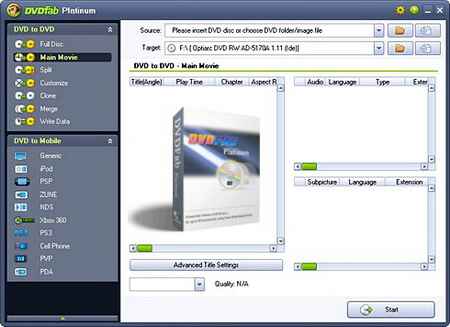
Вышла новая версия программы DVDFab Platinum, которая совмещает в себе возможности копирования DVD, преобразования видео в разные форматы и записи на диски. Программа успешно выполняет как создание копий дисков, так и подготовку видео в форматы, поддерживаемые мобильными устройствами, такими как iPod и PSP (MPEG-4/H.264 MP4). При копировании DVD можно выбрать один из нескольких режимов: полное копирование, копирование только основного фильма, выбор порядка воспроизведения клипов. Программа поддерживает и многие виды защиты, такие как CSS, RC, RCE, APS, UOPs, ARccOS, RipGuard, FluxDVD, CORE X2. Кроме этого, она может восстанавливать информацию даже в том случае, если файл IFO не читается. DVDFab выпускается в двух версиях: Platinum и Gold. Версия Platinum является более функциональной и содержит возможности конвертирования видео в разные форматы, а также опцию создания точных копий дисков. Русский язык присутствует.
Works on Windows Vista/XP/2000/98/ME.
Changes in DVDFab 5.0.2.2, May 23, 2008: * New: Added option "Create dvdid.xml which can be used by Windows Media Center" in "Settings -> DVD to DVD". * New: Added option "Memory amount used for converting" in "Settings -> DVD to Mobile -> Generic". The default value "Auto" should work well, and you can choose from "Low", "Normal", "High" and "Max" to see which one works best on your PC. (DVDFab Mobile Option) * New: Updated language files. * Fix: "Split" mode doesn't work in certain cases. * Fix: "Split" mode doesn't output ISO file for second disc when target is ISO. * Fix: Files in target folder will be deleted when converting DVD folder to ISO file. * Fix: Converting speed slowed down on some PC in last 5.0.2.0 release. (DVDFab Mobile Option) * Fix: Several crash problems in certain cases. * Fix: Several minor problems.